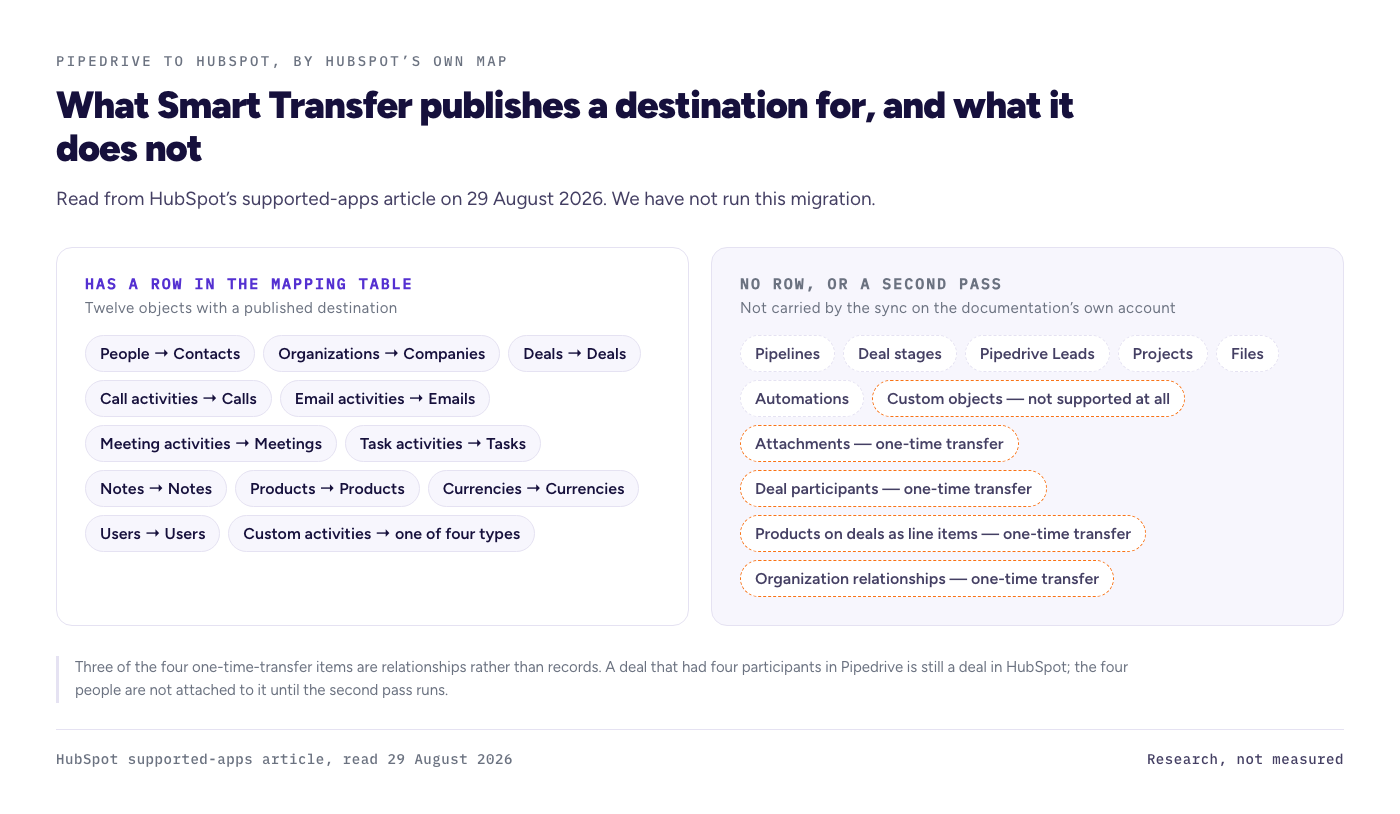
A Pipedrive to HubSpot migration has a native path, HubSpot's Smart Transfer, and HubSpot publishes a table of exactly what that path moves: People to Contacts, Organizations to Companies, Deals to Deals, and call, email, meeting, task and note activities to their HubSpot equivalents. The same table lists no row for pipelines, deal stages, Pipedrive Leads, Projects, Files or automations. Attachments and deal participants move only as a separate one time transfer, and custom objects do not move at all. Documentation read on 29 August 2026.
What this page is. This is the research version. Every statement below is read from HubSpot's and Pipedrive's own documentation on 29 August 2026, with the page named beside the claim. We have not run this migration ourselves yet. No hours, no record counts, no loss counts and no dollar total appear anywhere on this page, because none have been measured here. The measured version replaces this one when the run is logged, and it will say so in the same size type as the conclusion.
How does this page earn, and from whom?
It does not earn anything today. This site carries no affiliate links yet, because no affiliate disclosure page is live and no program has been confirmed in a dashboard. That matters on this page more than most, because a Pipedrive to HubSpot article sits between two companies that both run affiliate programs. When the gate opens, both arrangements will be stated here, above the conclusion rather than in a footer, so you can read the recommendation knowing exactly how it pays.
The rule this site works to is that the arrangement never picks the destination. "Stay on Pipedrive" is a conclusion this page is allowed to reach, and it is the conclusion that would cost the most, which is precisely why it has to stay available.
What does HubSpot's own migration tool actually move from Pipedrive?
HubSpot's Smart Transfer supports thirteen source applications, and Pipedrive is one of them. HubSpot publishes the object map rather than describing it in prose, which makes it the most checkable document in this whole search result. Here is that map as the supported apps article prints it, read on 29 August 2026.
| Pipedrive | HubSpot |
|---|---|
| People | Contacts |
| Organizations | Companies |
| Deals | Deals |
| Call Activities | Calls |
| Email Activities | Email Activities |
| Meeting Activities | Meetings |
| Task Activities | Tasks |
| Notes | Notes |
| Products | Products |
| Currencies | Currencies |
| Users | Users |
| Custom activities | Calls, Emails, Meetings or Tasks |
Two rows in that table are worth more than the rest. First, activity history has rows of its own, which is not true of every migration path and is the layer people most often find missing weeks later. Second, Pipedrive's custom activity types collapse into HubSpot's four fixed engagement types, so a custom activity called "site visit" arrives as a call, an email, a meeting or a task, and the distinction you built it for is gone.
What has no row in that table?
Pipelines, deal stages, Pipedrive Leads, Projects, Files and automations. None of the six appears in the Pipedrive mapping table on HubSpot's supported apps page, read on 29 August 2026. Pipedrive's own export article, read the same day, lists leads, deals, organizations, people, products, activities, projects, notes and files as exportable items, so three of those objects leave Pipedrive perfectly well and simply have no destination row on the other side.
HubSpot also names a short list of Pipedrive data that its ongoing sync does not carry and that has to be moved by a separate one time transfer after the sync: attachments, deal participants as contact associations, associated products on deals as deal line items, and organization relationships as labeled associations. Read those four again, because three of them are relationships rather than records. A deal that had four participants in Pipedrive is still a deal in HubSpot; the four people are not attached to it until the second pass runs.
The supported apps article is also explicit about the largest exclusion: "The transfer of custom objects isn't supported by HubSpot Smart Transfer." If your Pipedrive account has grown a custom object, the native path does not carry it, and no amount of field mapping changes that.
Does a Pipedrive to HubSpot migration carry your pipeline stages?
Not as data, on the documentation's own account. HubSpot's CRM migration process article puts pipelines in the preparation phase, where you "select the fields and other configuration elements you want to transfer", so pipelines are something you configure on the way in. The supported apps table, meanwhile, has no pipelines row and no deal stages row at all.
Read together, those two documents describe a setup decision rather than a data move. That is the single most useful thing to know before you start, because it changes the order of the work: the stage structure is something you build in HubSpot first and the deals arrive into it, rather than something you check afterwards and repair. It is also why every ranking page tells you to build a field mapping workbook and then never shows you one.
We are not going to tell you which stage each of your deals lands in, because we have not run it. What we can tell you today is that the vendor's own documentation does not promise your stage set arrives on its own.
How long does a Pipedrive to HubSpot migration take?
Nobody on page one answers that with a measurement, and the published figures disagree by two orders of magnitude. The migration service pages ranking for this term quote two to six hours, read 29 August 2026. Consultancy guides on the broader CRM migration term quote eight to twelve weeks. HubSpot's own process article says only that the sync "can take several hours to complete depending on the volume of data".
Those numbers are not really in conflict, because they are timing different things. The short figure is a data load: connect, select objects, wait, count rows. The long figure is a project: stage design, property creation, the one time transfers, deduplication, permissions, retraining a sales team and picking a cutover date. Neither figure is measuring the phase that actually swallows time, which is the fixing that starts after the sync summary says it succeeded.
This page prints no estimate of its own, because an estimate here would be exactly the thing the search result is already full of.
Should you move at all?
Sometimes no, and the documentation gives three honest reasons to stay put before anyone has run a timer. First, a custom object in Pipedrive has no native path, so a business whose real data lives in one is choosing a rebuild, not a migration. Second, the four one time transfer items are all relationship data, so the more your Pipedrive account depends on deal participants, product line items and labeled organization relationships, the more of the move is manual. Third, Smart Transfer is one way, from the other app into HubSpot, so there is no supported native route back through the same door.
Set against that, the case for moving is usually not a data case at all. It is that sales, marketing and service should sit on one contact record, and that is a real reason. What the documentation cannot tell you, and what this page will not pretend to, is what that is worth against the hours it costs you.
What we will measure, and against what
The protocol for the run was written on 19 August 2026 and published before any account was opened, which is the order this site works in. The test data is a synthetic fixture generated by a published script with a fixed seed, so anyone can rebuild the exact files: 100 companies, 500 contacts, 62 deals across two pipelines with different stage sets, 228 activities and 99 notes. It carries the traps a real database has, including mixed and blank phone formats, duplicate and case variant emails, custom fields of several types, multi currency deals and notes over 500 characters. No real person or company is in it.
The run itself is native tools only, no paid migration tool, timed in four separate phases: export, mapping, import and fix. Verification compares a fixed sample of 20 contacts, 10 companies, 10 deals and 10 notes field by field, and counts the associations still present. When that leg is logged, the measured numbers replace this section.
What this page does not cover
It does not tell you how many of your records survive, how long your migration takes, or what it costs, because nothing has been migrated here yet. It does not price any HubSpot or Pipedrive plan, because no price was read on a US screen on the day. It does not cover paid third party migration services, enterprise data volumes, the reverse direction from HubSpot into Pipedrive, or HubSpot's paid hubs beyond the CRM objects named above. Vendors change documentation without notice, and this page is one dated reading of it.
FAQ
Does Pipedrive export to HubSpot directly?
Effectively yes. HubSpot lists Pipedrive as one of thirteen supported apps for Smart Transfer and publishes the object map, so a CSV round trip is not the only route. Pipedrive's own export article also offers native exports of leads, deals, organizations, people, products, activities, projects, notes and files. Read 29 August 2026.
Do Pipedrive activities transfer to HubSpot?
The published map gives calls, emails, meetings, tasks and notes their own rows, so activity history has a supported path rather than being an afterthought. Custom activity types are the catch: they arrive as one of HubSpot's four engagement types, so a custom type you built for a reason loses that distinction on the way in.
How long does a Pipedrive to HubSpot migration take?
Published claims range from two to six hours on migration service pages to eight to twelve weeks on consultancy guides, read 29 August 2026. HubSpot says the sync can take several hours depending on volume. This site publishes measured hours per phase once the run is logged, and no estimate before that.
Can I keep Pipedrive and use HubSpot?
Smart Transfer is a one way transfer from the other app into HubSpot, so it is a move rather than a two way sync. Running both systems in parallel is a separate arrangement with its own rules about which system is the truth for which object, and it is not what this transfer path is for.
What does not come across from Pipedrive?
By HubSpot's own list, custom objects are not supported at all, and attachments, deal participants as contact associations, products on deals as line items, and organization relationships as labeled associations need a separate one time transfer. Pipelines, deal stages, Leads, Projects, Files and automations have no row in the mapping table.
Documentation read on 29 August 2026 from HubSpot's supported apps for Smart Transfer article, HubSpot's CRM migration process article, and Pipedrive's exporting data article. This page is research based, not measured, and it will be re-read before it publishes. Right of reply: the specific claims on this page have not yet been sent to HubSpot or Pipedrive. That goes out with a five working day deadline before publication, and the reply or the silence gets printed here.